> ## Documentation Index
> Fetch the complete documentation index at: https://docs.metabind.ai/llms.txt
> Use this file to discover all available pages before exploring further.
# What is Metabind
> The Agentic Layer for your App — turn your UI and APIs into a governed agent that runs in your own app and across every MCP host, rendered native from one BindJS definition
Metabind is **The Agentic Layer for your App** — it turns your existing app's UI and APIs into a governed agent. Under the hood, each project is a standards-compliant **MCP App**: you build it once — Interactive Tools, Data Tools, components in BindJS — and publish it to every MCP host (Claude, ChatGPT, and any other) with one button. The same MCP App also embeds inside your own iOS, Android, or web app as a native AI assistant via the Assistant SDK.
A defining capability is **real native rendering**: an Interactive Tool's UI compiles from a single BindJS definition to SwiftUI on iOS, Jetpack Compose on Android, and React on the web. No WebViews. No app-store releases for layout changes. No bespoke renderer per surface.
## Wrap any API as an MCP tool
A Metabind **Data Tool** is a typed function the AI can call. You declare an input schema, an output schema, and a handler that runs in a V8 sandbox with your secrets injected at runtime — so credentials never reach the client, and there's no server to host or scale. Point a handler at any REST or GraphQL endpoint and it's an MCP tool.
## Get native UI from one tool call
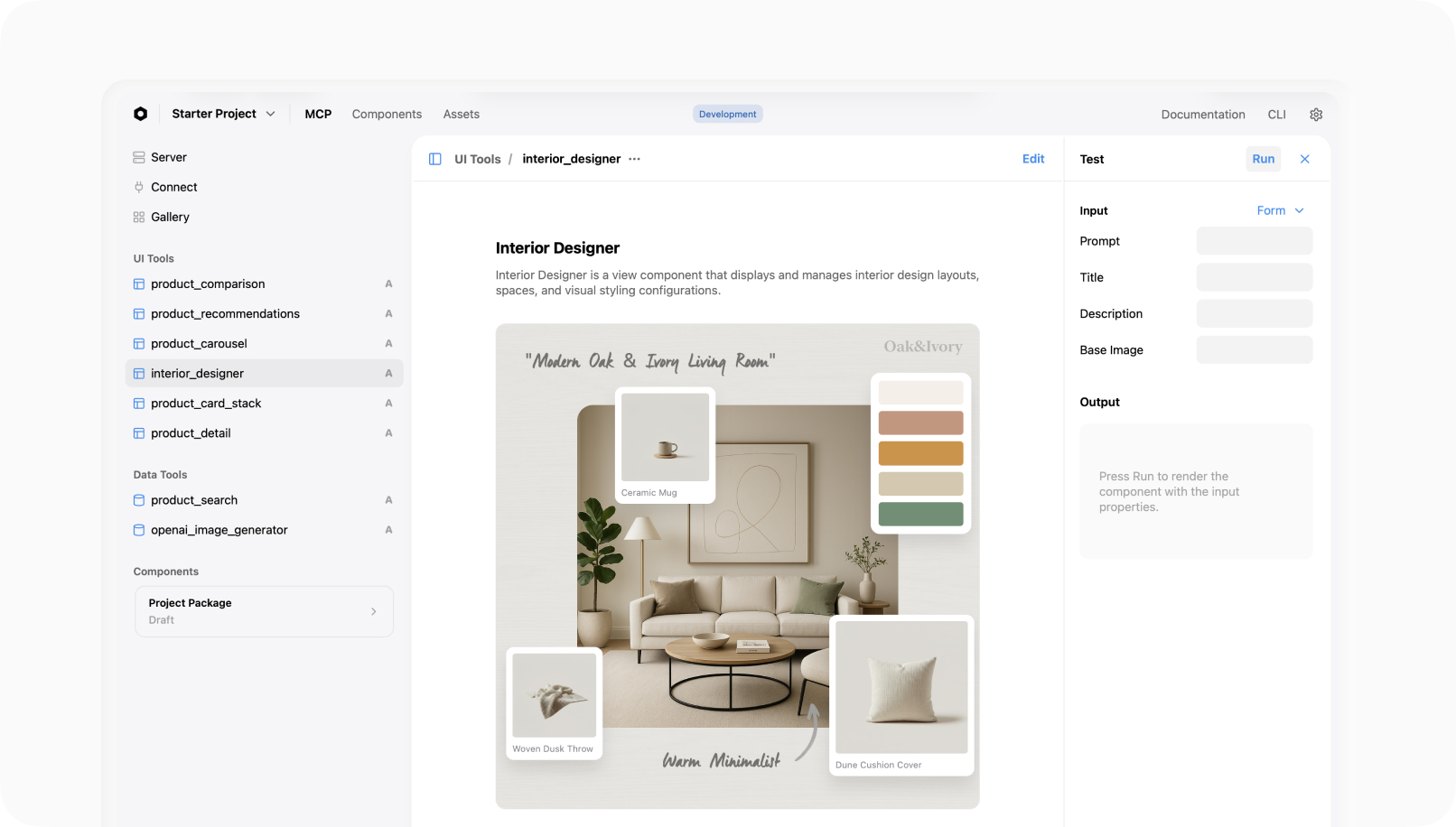
Most MCP servers return JSON dumps. Metabind's **Interactive Tools** return real, schema-validated native UI — product cards, comparison tables, galleries, 3D viewers — from a single BindJS component definition. When the AI calls the tool, Metabind validates its response against your schema and renders only components from your published allowlist. The AI can't inject anything you didn't approve, on any platform.
.png) Every MCP App also bundles the BindJS **components** your tools render, **project instructions** that tell the AI when to call which tool, and **governance** — schema validation, component allowlists, package versioning, and instant rollback — built in as platform features, not custom infrastructure.
## How it works
Build Data Tools and Interactive Tools in the visual builder, with live previews on a real device as you go. Everything is testable from the first save.
Every MCP App also bundles the BindJS **components** your tools render, **project instructions** that tell the AI when to call which tool, and **governance** — schema validation, component allowlists, package versioning, and instant rollback — built in as platform features, not custom infrastructure.
## How it works
Build Data Tools and Interactive Tools in the visual builder, with live previews on a real device as you go. Everything is testable from the first save.
 Every project ships two MCP server URLs — a draft endpoint that serves everything (published, modified, draft) and a production endpoint that serves only published work. Point Claude Desktop at the draft URL while you iterate.
One button promotes the draft to `mcp.metabind.ai//`. Claude Desktop, ChatGPT, VS Code, and any MCP-compatible host connect with the URL.
The Assistant SDK ships the same MCP App as a native AI assistant inside your iOS, Android, or web product — same tools, same governance, rendered as SwiftUI, Jetpack Compose, or React.
## Two distribution surfaces, one MCP App
Every project ships two MCP server URLs — a draft endpoint that serves everything (published, modified, draft) and a production endpoint that serves only published work. Point Claude Desktop at the draft URL while you iterate.
One button promotes the draft to `mcp.metabind.ai//`. Claude Desktop, ChatGPT, VS Code, and any MCP-compatible host connect with the URL.
The Assistant SDK ships the same MCP App as a native AI assistant inside your iOS, Android, or web product — same tools, same governance, rendered as SwiftUI, Jetpack Compose, or React.
## Two distribution surfaces, one MCP App
 | Surface | What ships | Renderer |
| ------------------------ | ----------------------------------------------------------------------------------------------------------------------------- | ------------------------------------------------------- |
| **Every MCP host** | Hosted MCP server URL on `mcp.metabind.ai`. Claude Desktop, ChatGPT, and any host that speaks the MCP protocol connect to it. | Sandboxed iframe via `@bindjs/renderer` (React). |
| **Embedded in your app** | The Assistant SDK — `metabind-ai-apple` and `metabind-ai-android`. | Native SwiftUI or Jetpack Compose directly in your app. |
You don't choose between these. One publish reaches both.
## What you don't build
| You'd normally build | Metabind handles |
| ------------------------------------------------- | --------------------------------------------------------------------- |
| Protocol boilerplate, transport, host conformance | Hosted MCP server on `mcp.metabind.ai` |
| Tool input/output schema plumbing | Auto-generated from your component definitions |
| Server hosting, scaling, monitoring | Auto-scaling multi-tenant infrastructure on AWS |
| UI rendering code per platform | SwiftUI, Compose, and React from one BindJS definition |
| Visual tooling for authoring + previews | MCP App Studio — visual builder, live device previews, sample apps |
| Staging, versioning, rollback | Draft + production endpoints, package versioning, one-button rollback |
## How is this different from building your own MCP server?
Building an MCP server from scratch means writing transport and host conformance, schema validation in both directions, secret management, hosting and scaling, and a UI renderer for every surface you want to support — then maintaining all of it as the protocol evolves. Metabind ships that entire layer as a managed platform. You write the tools that are unique to your product; everything underneath — protocol, hosting, validation, governance, and native rendering — is provided and kept current.
## Built on open protocols
Metabind aligns with the open Model Context Protocol per [SEP-1724](https://github.com/modelcontextprotocol/specification/blob/main/SEP/draft/SEP-1724.md), and Interactive Tools follow [SEP-1865 (MCP Apps: Interactive User Interfaces for MCP)](https://github.com/modelcontextprotocol/specification/blob/main/SEP/draft/SEP-1865.md). Anything you build on Metabind speaks the MCP wire format and runs in any MCP-compatible host.
## Common questions
Yes. Author BindJS components in MCP App Studio or directly in code. Component allowlists per tool determine which of your components are eligible to render — a `product_search` tool can render `ProductCard` but not `AdminTable`, enforced at render time.
Yes — that's what Data Tools are. Point a Data Tool handler at any REST or GraphQL endpoint, declare the input and output schema, and the platform handles auth, sandboxing, and schema validation in both directions.
Starter: MCP App Studio, BindJS, and the Assistant SDK included, with a free invocation allowance. No credit card.
No. The web renderer (`@bindjs/renderer`) ships React components into every MCP host's sandboxed iframe by default. Native SwiftUI and Jetpack Compose rendering is unlocked by the Assistant SDK when you embed the MCP App inside your own iOS or Android app.
## Start building
No credit card. Publish your first MCP App in minutes.
Five minutes, no code — Oak & Ivory product cards rendering inline in Claude Desktop.
If you've never seen Metabind in action, start with the five-minute walkthrough, then come back when you want the full map below.
## How the rest of these docs are organized
Publish a working MCP App to Claude Desktop in five minutes using the Oak & Ivory retail sample.
The mental model — Types, Components, native rendering, and governance.
The day-to-day authoring workflow — Interactive Tools, Data Tools, BindJS, allowlists, sandbox.
Package versioning, publishing the server, rolling back.
Claude Desktop, ChatGPT, and any other MCP host.
Embed your MCP App as a native AI assistant inside your iOS, Android, or React app.
Roles, audit logs, project visibility, SSO.
Reference MCP Apps you can clone, study, and run end-to-end.
| Surface | What ships | Renderer |
| ------------------------ | ----------------------------------------------------------------------------------------------------------------------------- | ------------------------------------------------------- |
| **Every MCP host** | Hosted MCP server URL on `mcp.metabind.ai`. Claude Desktop, ChatGPT, and any host that speaks the MCP protocol connect to it. | Sandboxed iframe via `@bindjs/renderer` (React). |
| **Embedded in your app** | The Assistant SDK — `metabind-ai-apple` and `metabind-ai-android`. | Native SwiftUI or Jetpack Compose directly in your app. |
You don't choose between these. One publish reaches both.
## What you don't build
| You'd normally build | Metabind handles |
| ------------------------------------------------- | --------------------------------------------------------------------- |
| Protocol boilerplate, transport, host conformance | Hosted MCP server on `mcp.metabind.ai` |
| Tool input/output schema plumbing | Auto-generated from your component definitions |
| Server hosting, scaling, monitoring | Auto-scaling multi-tenant infrastructure on AWS |
| UI rendering code per platform | SwiftUI, Compose, and React from one BindJS definition |
| Visual tooling for authoring + previews | MCP App Studio — visual builder, live device previews, sample apps |
| Staging, versioning, rollback | Draft + production endpoints, package versioning, one-button rollback |
## How is this different from building your own MCP server?
Building an MCP server from scratch means writing transport and host conformance, schema validation in both directions, secret management, hosting and scaling, and a UI renderer for every surface you want to support — then maintaining all of it as the protocol evolves. Metabind ships that entire layer as a managed platform. You write the tools that are unique to your product; everything underneath — protocol, hosting, validation, governance, and native rendering — is provided and kept current.
## Built on open protocols
Metabind aligns with the open Model Context Protocol per [SEP-1724](https://github.com/modelcontextprotocol/specification/blob/main/SEP/draft/SEP-1724.md), and Interactive Tools follow [SEP-1865 (MCP Apps: Interactive User Interfaces for MCP)](https://github.com/modelcontextprotocol/specification/blob/main/SEP/draft/SEP-1865.md). Anything you build on Metabind speaks the MCP wire format and runs in any MCP-compatible host.
## Common questions
Yes. Author BindJS components in MCP App Studio or directly in code. Component allowlists per tool determine which of your components are eligible to render — a `product_search` tool can render `ProductCard` but not `AdminTable`, enforced at render time.
Yes — that's what Data Tools are. Point a Data Tool handler at any REST or GraphQL endpoint, declare the input and output schema, and the platform handles auth, sandboxing, and schema validation in both directions.
Starter: MCP App Studio, BindJS, and the Assistant SDK included, with a free invocation allowance. No credit card.
No. The web renderer (`@bindjs/renderer`) ships React components into every MCP host's sandboxed iframe by default. Native SwiftUI and Jetpack Compose rendering is unlocked by the Assistant SDK when you embed the MCP App inside your own iOS or Android app.
## Start building
No credit card. Publish your first MCP App in minutes.
Five minutes, no code — Oak & Ivory product cards rendering inline in Claude Desktop.
If you've never seen Metabind in action, start with the five-minute walkthrough, then come back when you want the full map below.
## How the rest of these docs are organized
Publish a working MCP App to Claude Desktop in five minutes using the Oak & Ivory retail sample.
The mental model — Types, Components, native rendering, and governance.
The day-to-day authoring workflow — Interactive Tools, Data Tools, BindJS, allowlists, sandbox.
Package versioning, publishing the server, rolling back.
Claude Desktop, ChatGPT, and any other MCP host.
Embed your MCP App as a native AI assistant inside your iOS, Android, or React app.
Roles, audit logs, project visibility, SSO.
Reference MCP Apps you can clone, study, and run end-to-end.