

Wrap any API as an MCP tool
A Metabind Data Tool is a typed function the AI can call. You declare an input schema, an output schema, and a handler that runs in a V8 sandbox with your secrets injected at runtime — so credentials never reach the client, and there’s no server to host or scale. Point a handler at any REST or GraphQL endpoint and it’s an MCP tool.Get native UI from one tool call
Most MCP servers return JSON dumps. Metabind’s Interactive Tools return schema-validated, rendered components — product cards, comparison tables, galleries, 3D viewers — from a single BindJS component definition. When the AI calls the tool, Metabind validates its response against your schema and renders only components from your published allowlist. The AI can’t inject anything you didn’t approve, on any platform..png)
How it works
1
Author tools in Metabind Studio
Build Data Tools and Interactive Tools in the visual builder, with live previews on a real device as you go. Everything is testable from the first save.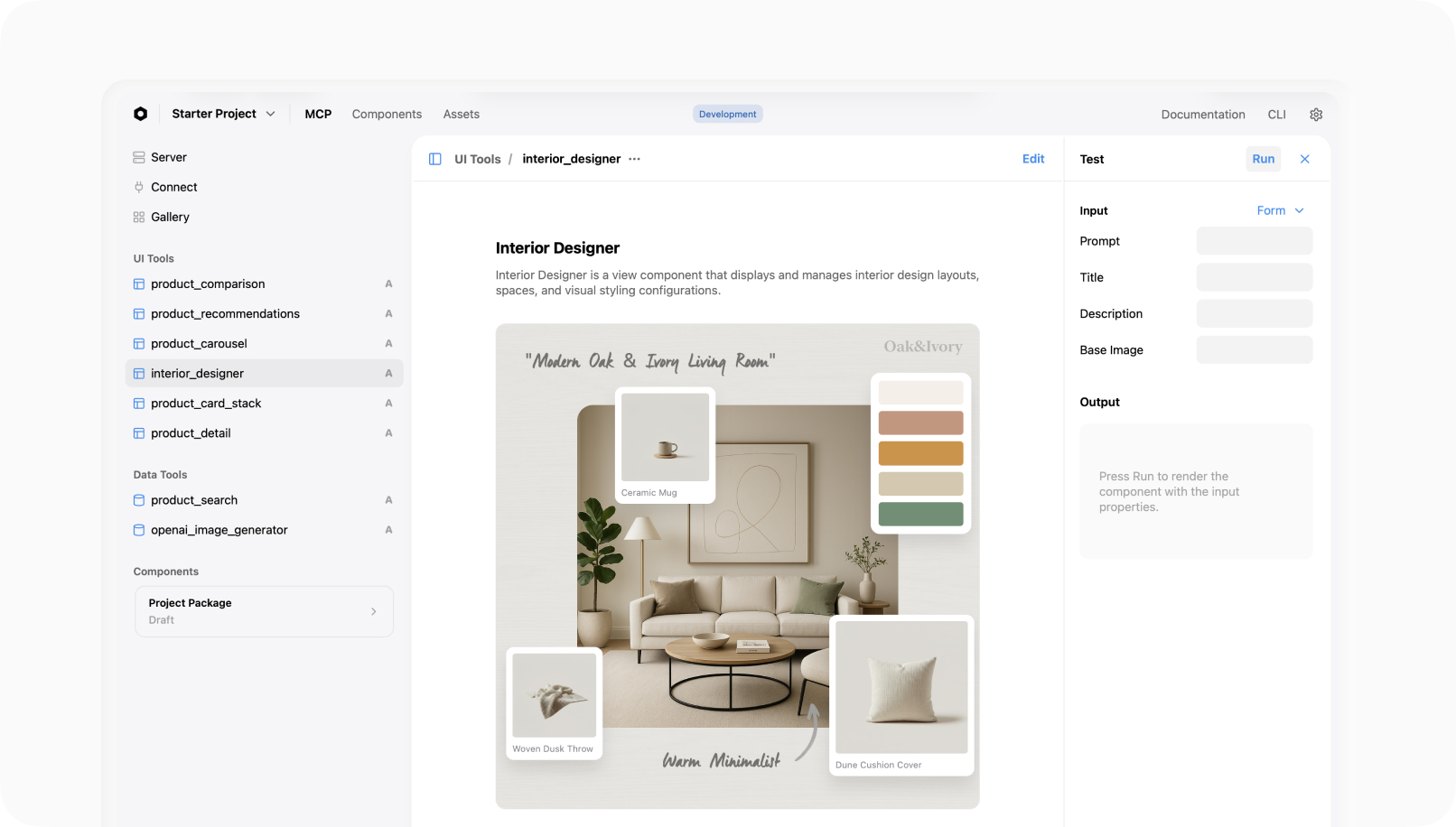
2
Test against the draft endpoint
Every project ships two MCP server URLs — a draft endpoint that serves everything (published, modified, draft) and a production endpoint that serves only published work. Point Claude Desktop at the draft URL while you iterate.
3
Publish to every MCP host
Publishing promotes the draft to
mcp.metabind.ai/<your-org>/projects/<your-project>. Claude Desktop, ChatGPT, VS Code, and any MCP-compatible host connect with the URL.4
Embed in your own app
The Assistant SDK embeds the same MCP App as a governed agent inside your iOS, Android, or web product — same tools, same governance, rendered as SwiftUI, Jetpack Compose, or React.
Two distribution surfaces, one MCP App

You don’t choose between these. One publish reaches both.
What you don’t build
How is this different from building your own MCP server?
Building an MCP server from scratch means writing transport and host conformance, schema validation in both directions, secret management, hosting and scaling, and a UI renderer for every surface you want to support — then maintaining all of it as the protocol evolves. Metabind ships that entire layer as a managed platform. You write the tools that are unique to your product; everything underneath — protocol, hosting, validation, governance, and native rendering — is provided and kept current.Built on open protocols
Metabind aligns with the open Model Context Protocol and its extensions framework (SEP-2133, first proposed as SEP-1724), and Interactive Tools follow SEP-1865 (MCP Apps: Interactive User Interfaces for MCP). Anything you build on Metabind speaks the MCP wire format and runs in any MCP-compatible host.Common questions
Can I use my own components?
Can I use my own components?
Yes. Author BindJS components in Metabind Studio or directly in code. Component allowlists per tool determine which of your components are eligible to render — a
product_search tool can render ProductCard but not AdminTable, enforced at render time.Can I connect my own APIs?
Can I connect my own APIs?
Yes — that’s what Data Tools are. Point a Data Tool handler at any REST or GraphQL endpoint, declare the input and output schema, and the platform handles auth, sandboxing, and schema validation in both directions.
What's the free tier?
What's the free tier?
Free: Metabind Studio, BindJS, and the Assistant SDK included, with a free invocation allowance. No credit card.
Do I have to use native mobile rendering?
Do I have to use native mobile rendering?
No. The web renderer (
@metabindai/bindjs-react) ships React components into every MCP host’s sandboxed iframe by default. Native SwiftUI and Jetpack Compose rendering is unlocked by the Assistant SDK when you embed the MCP App inside your own iOS or Android app.Start building
Start free
No credit card required to build and publish your first MCP App.
Your first MCP App
Five minutes, no code — Oak & Ivory product cards rendering inline in Claude Desktop.
How the rest of these docs are organized
Your first MCP App
Publish a working MCP App to Claude Desktop in five minutes using the Oak & Ivory retail sample.
Core Concepts
The mental model — Types, Components, native rendering, and governance.
Building Your MCP App
The day-to-day authoring workflow — Interactive Tools, Data Tools, BindJS, allowlists, sandbox.
Publishing
Package versioning, publishing the server, rolling back.
Connecting to MCP hosts
Claude Desktop, ChatGPT, and any other MCP host.
Assistant SDK
Embed your MCP App as a governed agent inside your iOS, Android, or web app.
Operations
Roles, audit logs, project visibility, SSO.
Sample Apps
Reference MCP Apps you can clone, study, and run end-to-end.