Documentation Index

Fetch the complete documentation index at: https://docs.metabind.ai/llms.txt

Use this file to discover all available pages before exploring further.

MCP App Studio is the web application at www.metabind.ai where developers and product teams build MCP Apps. It’s the layer that sits on top of BindJS and the Metabind backend: a visual builder, a code editor, live device previews, a tool-test harness, an asset library, and the publishing surface — all wired into the same project. Most MCP frameworks are SDKs that ship without a development surface; the developer sets up their own editor, hosting, debugging, and review workflow. MCP App Studio is what most MCP tooling doesn’t have.

What MCP App Studio gives you

CapabilityWhat it covers
Visual component builderInspector-driven configuration of components — single-line fields, multi-line text, sliders, color pickers, asset pickers — generated from the component’s inspector schema. Non-developers can configure tools without touching code.
Code editorFull BindJS code editor for component authoring. Live preview rendering alongside the code. Syntax highlighting, error reporting, and TypeScript-aware completion.
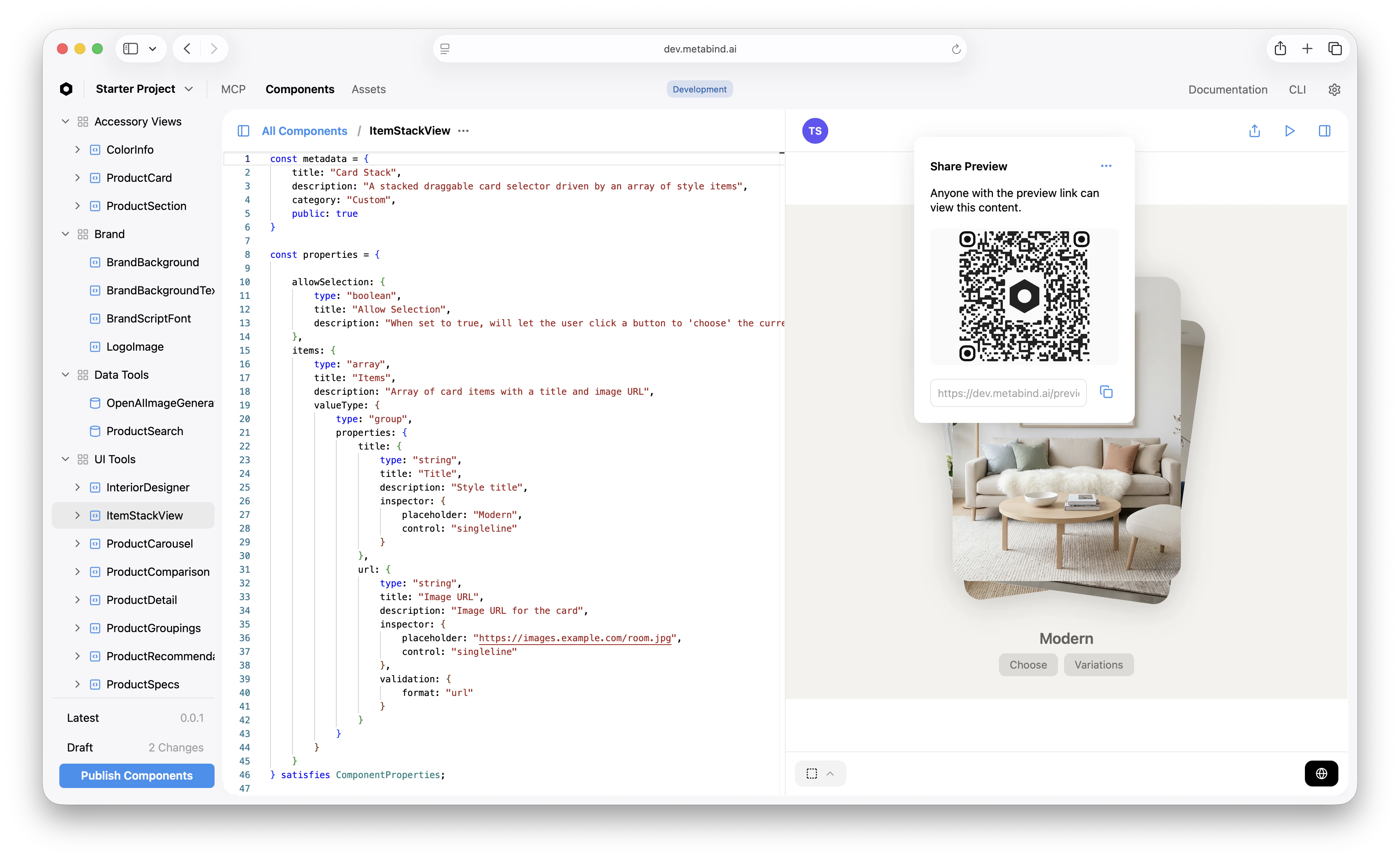
Live device previewsGenerate a preview link for any component, content, or MCP App. iOS opens as an App Clip — instant, no install, real native SwiftUI on the device. Android opens in the Metabind preview app. Web opens in the browser.
Tool test harnessRun any Interactive Tool or Data Tool with synthetic input. The same code path that runs when an AI calls the tool — schema validation, package resolution, sandboxed execution — runs here.
Asset libraryDrag-and-drop upload, semantic search, tagging, and inline preview for images, video, 3D, and PDFs.
Server configProject metadata, AI instructions, server settings, OAuth, visibility (private vs. public), rate limiting.
Connect tabProduction and draft MCP server URLs, plus copy-paste config snippets for Claude Desktop, ChatGPT, and any custom MCP host.
Publish workflowDraft and production endpoints, package versioning, modified-status tracking, instant rollback.
Sample appsClone a working MCP App in seconds — start from Oak & Ivory or any other sample.
The top navigation has three tabs:
  • MCP — Server, Connect, Gallery, UI Tools (Interactive Tools), Data Tools, Components.
  • Components — the BindJS code editor surface for every component in the package.
  • Assets — the media library.
Inside an MCP project, the left sidebar groups everything by what it does:
SectionContains
ServerProject metadata, AI instructions, visibility
ConnectMCP server URLs and host config snippets
GalleryLive preview gallery
UI ToolsInteractive Tools — one entry per Type
Data ToolsData Tools — one entry per Type
ComponentsThe BindJS source for everything that backs a Type
Project-level settings (API keys, dependencies, team, billing) sit under a separate Settings menu.
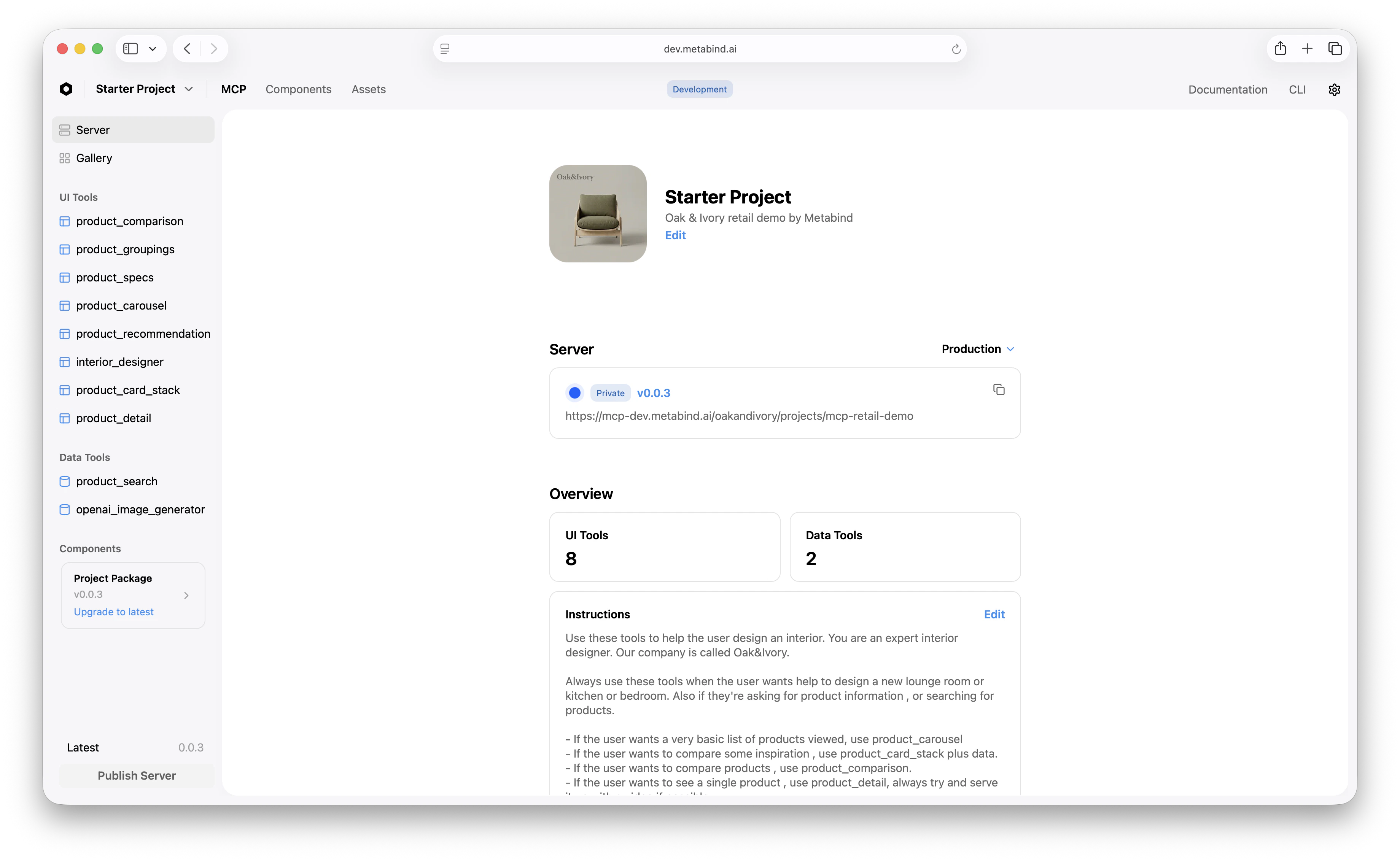
The project sidebar in MCP App Studio — Server and Gallery at the top, then UI Tools, Data Tools, and Components grouped below

Roles and the multi-discipline model

MCP App Studio is designed so different team roles work in the surfaces meant for them:
  • Developers spend most of their time in the Components tab — authoring BindJS, defining component properties, configuring data handlers.
  • Product managers work in UI Tools and Data Tools — defining tool schemas, writing AI-facing descriptions, configuring allowed components.
  • Designers work in Components (visual configuration via the inspector) and Assets — maintaining the design system and the media library directly, without filing engineering tickets.
  • Content editors work in the Content surface, managing entries that Data Tools query as a headless CMS backend.
Each role can ship without blocking the others. A font change is a designer task in MCP App Studio, not a developer ticket.

Live device previews

MCP App Studio generates a preview URL for any component, Interactive Tool, or whole MCP App. The URL behaves differently per platform:
  • iOS: Opens as an App Clip on iOS 14+ — no App Store install, real native SwiftUI rendering on the device. The app clip is signed and bundled by Metabind; it loads your project’s package and renders the requested component.
  • Android: Opens in the Metabind Preview app, which the developer installs once. The app loads the requested component’s BindJS bundle and renders as native Compose.
  • Web: Opens in the browser, rendered by @bindjs/renderer (React).
Preview connects to the project’s draft endpoint by default, so you can iterate before publishing without affecting production.
MCP App Studio with a Share Preview QR code modal open over the Components editor — scannable from an iOS device to launch the App Clip

What MCP App Studio is built on

MCP App Studio is a React application that talks to the Metabind backend. It’s part of the platform — not a separate product — but conceptually it sits at the same layer as the BindJS authoring layer: developer-trust surface, used every day, where the developer’s relationship with Metabind happens.

Your first MCP App

The end-to-end walkthrough using MCP App Studio.

Building Your MCP App

How-tos for the surfaces MCP App Studio exposes.

Testing tools

How-to: use the MCP App Studio test harness.

Live device previews

How-to: preview on a real device before publishing.